DDZynth

DDZynth 1.84

FFT, Granular, Wavetable ,Fm and Pm Sampler instrument, Vst, Vst3 for Windows and Vst & AU for Mac is available Now. 2 Sample slots to drug n drop or open with knob WAV files. scan true sample with mouse click, with right button smooth scan. On top in FFT processor with FFt size control , Transpose , Transpose lfo&amount, Start position and Phase lock button controls. Second is Granular with Density, Duration ,pitch&position randomization, Transpose , Transpose lfo&amount, Start position controls . 5 Lfos for Transposes , Start Positions and Filter. 2 little knobs near LFOs is note reset(bottom) and BPM synk(top). 7 LFO waveforms, 1 and 2 is from loaded wav files buffer. From both slots signals goes to mix section Slot1 and Slot2, aswell true FFT cross and morph mixers. Part of tables loaded to CrossFM and CrossPM sections on bottom left to make evolving FM & PM sounds. Fm&Pm can be mixed to FFT section as well. On Bottom right is filter(HP,BP,LP), reverb send and Gate send to make gated midi parts.

New in 1.84

fixed: After reload in project sometimes scrubber not work properly. jump artefacts on note start.

code is optimized

New in 1.83 :

Preset system reworked to final stage) single file with all data for easy share. New controls for Granular synthesis , Dur. Lock locking granules size to Density in way they never overlap. G. Trans transposition with note for granules size to play in scale. Fm & Pm synthesis buffer size smooth change, no clicks when Fm&Pm during wav scan. declick envelope on buffer.

nice and cool presets coming soon)

enjoy.

Manual pdf is here , Lite version with reduced functionality is FREE (old version)

70 Euro

KranchDD * Free

KranchDD

Updated to 1.81 4x Oversampling button, New Distortion modes, GUI optimizations.

Updated to 1.8. Performance & GUI optimizations, Dry signal goes through Clipper.

Updated to 1.7. More balanced levels, new Distortion algorithm, Distortion algorithms tuned.

Kranchy Filter combined with different distortion algoritms. Available for PC (VST,VST3) and Mac(Vst,Au).Unzip, Install, make Music.

Download Free

KuberWide

KuberWide — Stereo Widener & Room Simulator

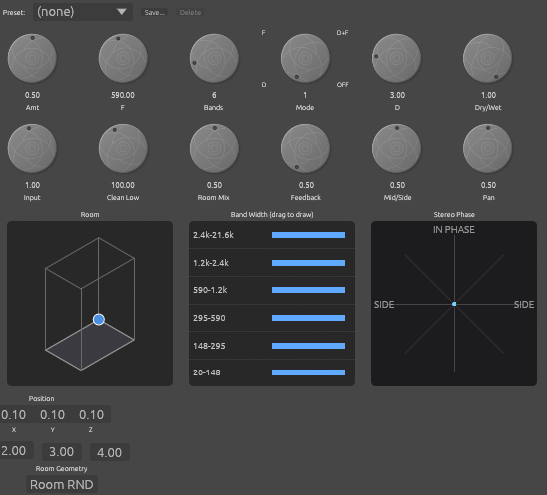
KuberWide widens and places your sound in space. It combines a stereo widener with four modes and a 3D room that adds early reflections, so a flat track can sound wider and sit in a real-feeling space. A Clean Low filter keeps the low end tight and centered while you widen.

It works on mono sources as well as stereo ones: mono material gets new width, and stereo material is widened further without losing its original image.

Key features

  • Four widening modes: D (delay flutter), F (spectral band widening), D+F (both together) and OFF
  • Spectral band widener: splits the sound into 4–16 frequency bands, and you draw how wide each band should be
  • 3D room simulator: set the room’s size and where the sound sits in it, by dragging in the 3D room view or by typing numbers
  • Clean Low: keeps bass and kick centered and untouched by the widening
  • Mid/Side width control and an output Pan
  • Stereo phase meter (goniometer), so you can see the stereo image live
  • Room RND: one click picks a random room size and position
  • Preset browser with save and delete, plus 9 factory presets
  • Resizable window
  • VST3 and CLAP

Controls

Widener

ControlWhat it does
AmtHow strongly the frequency bands are widened (F mode)
FCenter frequency of the widening, 100 Hz – 5 kHz: lower values widen the lows and mids more, higher values widen the highs more
BandsNumber of frequency bands, 4–16
ModeD / F / D+F / OFF
DDelay time for the flutter widener, 2–12 ms (D mode)
Band Width curveDrag across the bands to draw how wide each one is

Room

ControlWhat it does
Room MixHow much room sound is added
FeedbackRoom damping: lower values give a darker, more absorbent room
Position X/Y/ZWhere the sound sits inside the room
Room Geometry X/Y/ZRoom size, up to 15 on each axis
Room RNDPicks a random room size and position

Output

ControlWhat it does
InputInput level
Clean LowFrequencies below this point (5 Hz – 6 kHz) stay dry and centered
Mid/SideOverall stereo width
PanOutput panning
Dry/WetBalance between the original and the processed signal

Try before you buy

Demo Windows

Demo Linux

Demo MacOS

Price 30Euro

Buy KuberWide