
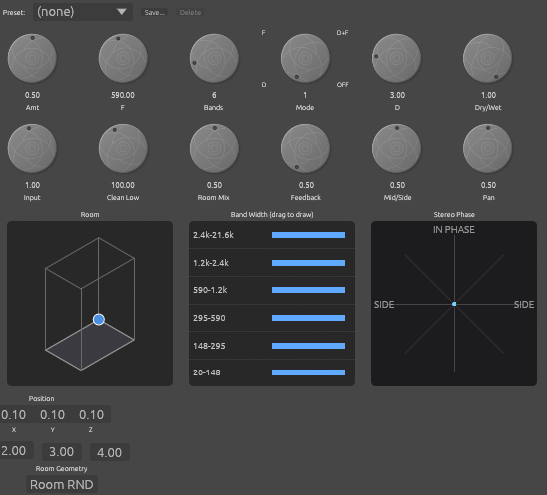
KuberWide — Stereo Widener & Room Simulator
KuberWide widens and places your sound in space. It combines a stereo widener with four modes and a 3D room that adds early reflections, so a flat track can sound wider and sit in a real-feeling space. A Clean Low filter keeps the low end tight and centered while you widen.
It works on mono sources as well as stereo ones: mono material gets new width, and stereo material is widened further without losing its original image.
Key features
- Four widening modes: D (delay flutter), F (spectral band widening), D+F (both together) and OFF
- Spectral band widener: splits the sound into 4–16 frequency bands, and you draw how wide each band should be
- 3D room simulator: set the room’s size and where the sound sits in it, by dragging in the 3D room view or by typing numbers
- Clean Low: keeps bass and kick centered and untouched by the widening
- Mid/Side width control and an output Pan
- Stereo phase meter (goniometer), so you can see the stereo image live
- Room RND: one click picks a random room size and position
- Preset browser with save and delete, plus 9 factory presets
- Resizable window
- VST3 and CLAP
Controls
Widener
| Control | What it does |
|---|---|
| Amt | How strongly the frequency bands are widened (F mode) |
| F | Center frequency of the widening, 100 Hz – 5 kHz: lower values widen the lows and mids more, higher values widen the highs more |
| Bands | Number of frequency bands, 4–16 |
| Mode | D / F / D+F / OFF |
| D | Delay time for the flutter widener, 2–12 ms (D mode) |
| Band Width curve | Drag across the bands to draw how wide each one is |
Room
| Control | What it does |
|---|---|
| Room Mix | How much room sound is added |
| Feedback | Room damping: lower values give a darker, more absorbent room |
| Position X/Y/Z | Where the sound sits inside the room |
| Room Geometry X/Y/Z | Room size, up to 15 on each axis |
| Room RND | Picks a random room size and position |
Output
| Control | What it does |
|---|---|
| Input | Input level |
| Clean Low | Frequencies below this point (5 Hz – 6 kHz) stay dry and centered |
| Mid/Side | Overall stereo width |
| Pan | Output panning |
| Dry/Wet | Balance between the original and the processed signal |
Try before you buy
Demo Windows
Demo Linux
Demo MacOS
Price 30Euro
Buy KuberWide